Event platform
Event management for nonprofit teams that need less scramble before, during, and after the event.
Fundamentl helps nonprofits launch event pages, sell tickets, manage sponsor flow, coordinate meals and seating, run check-in, and follow up afterward from one system. It is designed for real event operations, not just ticket checkout.
- Ticketing, attendee management, and event-day check-in
- Sponsor workflows, add-ons, and follow-up built into the module
- Designed for nonprofit fundraising events, not generic event software
What teams stop chasing
- 1 event system
- for launch, registration, check-in, and post-event follow-up
- QR-ready
- for faster on-site check-in and cleaner attendance records
- Sponsor-aware
- with sponsorship, upgrades, and revenue context tied together
- Seat + meal flow
- for the operational details that usually cause last-minute stress
Screenshots, feature descriptions, and visible product claims reflect the current product build as of May 13, 2026.
Product views
What does nonprofit event management software look like in practice?
These are real screens from the current module so buyers can evaluate workflow depth, not just abstract feature claims.
Registration queue
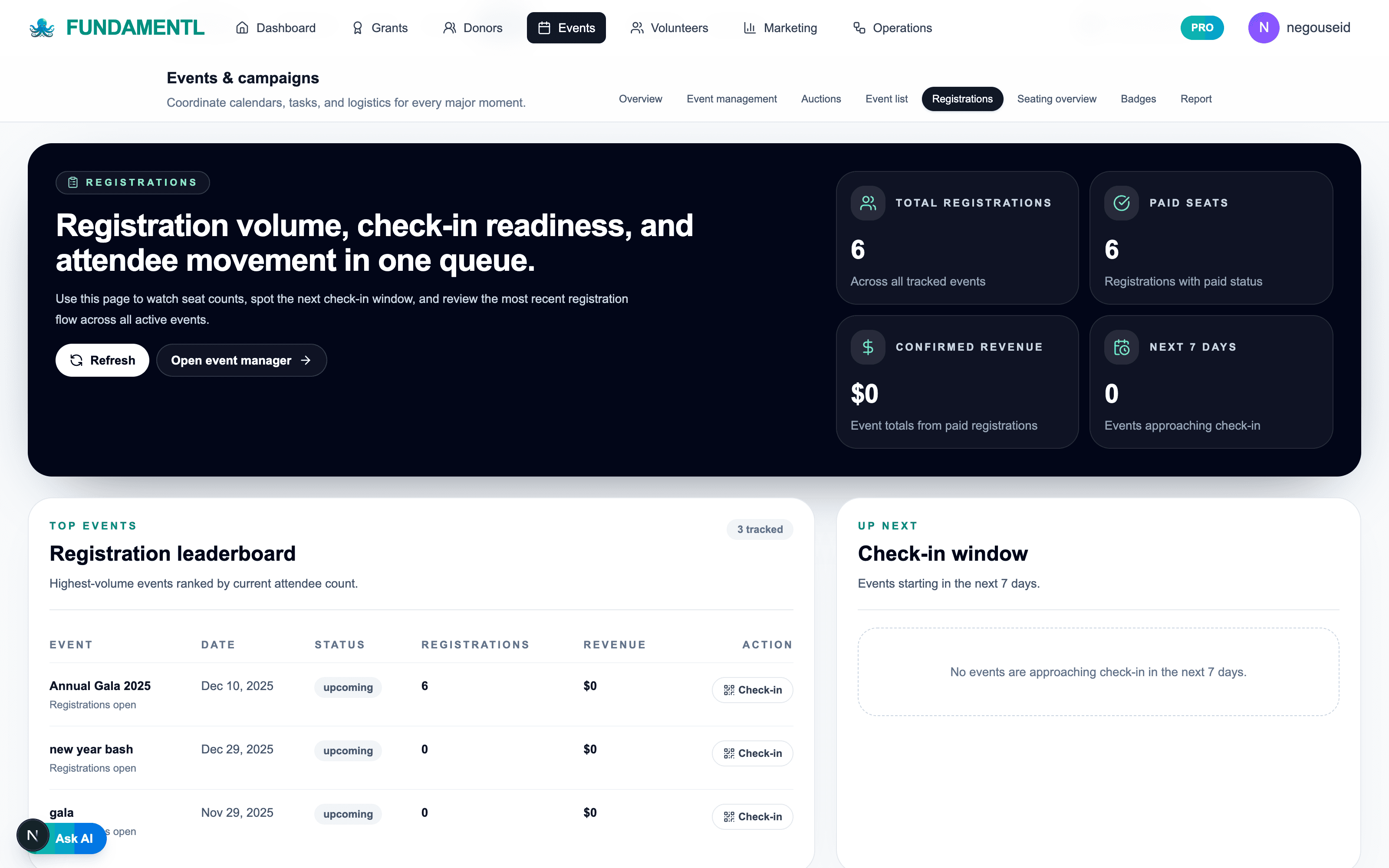
Watch seat count, paid status, and check-in readiness from one view.
Event command
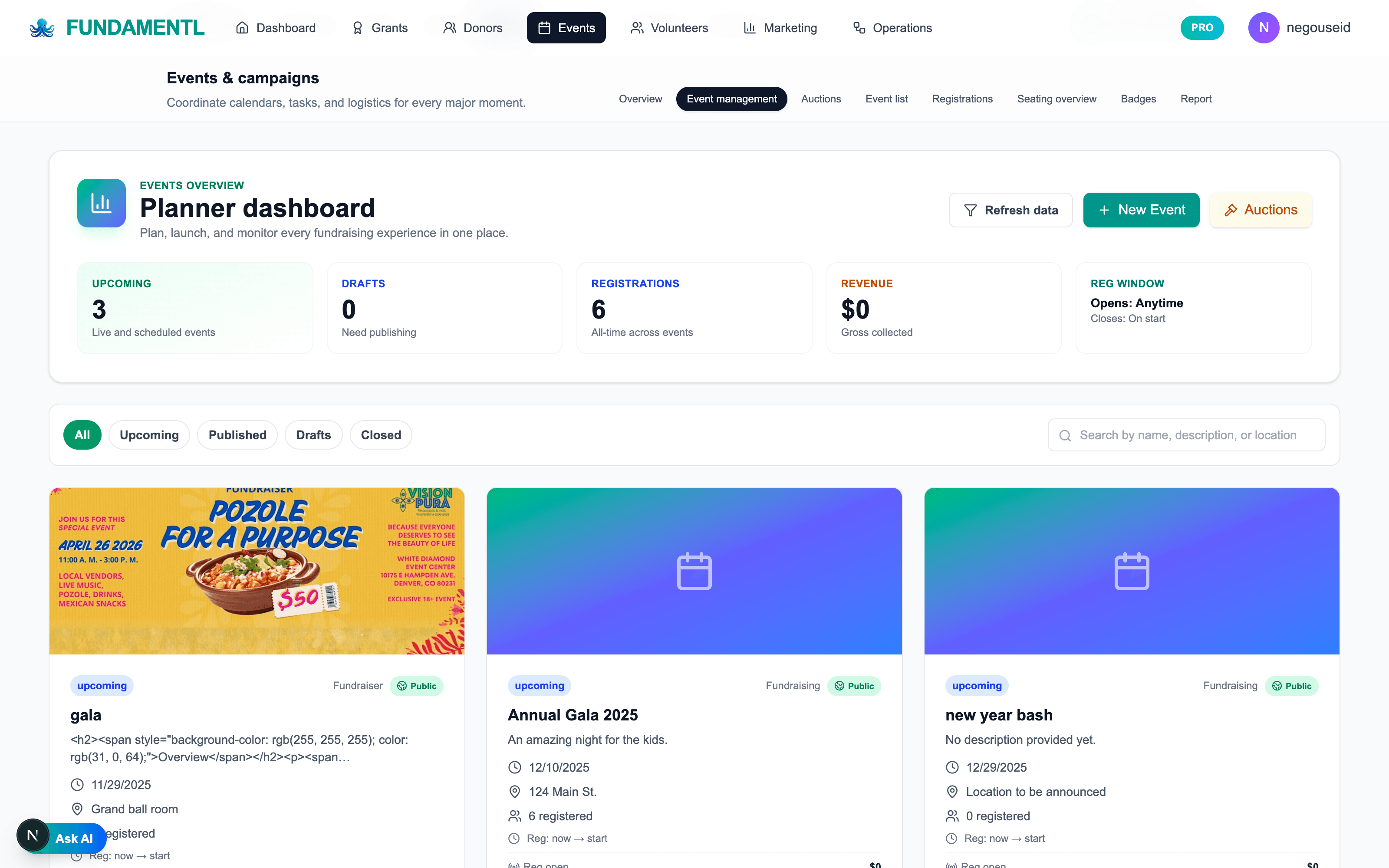
Keep launch, publishing, and event pipeline status visible before the event week hits.
Best fit
Who is nonprofit event management software best for?
Nonprofit events are not just about selling seats. They involve sponsorships, upgrades, guest lists, seating, meal details, day-of execution, and revenue follow-up. Fundamentl treats the full fundraising event as one operating workflow so the team can keep control from launch to wrap-up.
Best for
- Galas, luncheons, and fundraising events with sponsors, table buyers, and day-of logistics
- Teams that want clearer attendee and revenue visibility before the event starts
- Organizations that need the event data to stay connected to donor and operations context
Why teams switch
- Event registration, sponsor handling, meals, and check-in live together instead of in separate tools
- Operational details like ticket upgrades and meal follow-up stay tied to real attendee records
- Revenue and turnout stay readable from one system before the board asks for the recap
From event scramble to event control
Nonprofit events break when ticketing, attendee detail, and fundraiser operations do not talk to each other.
The visible problem is usually check-in stress. The deeper problem is that sponsors, guests, upgrades, meals, and follow-up all live in separate systems until the event week exposes it.

Common event headaches
The common workflow drag this product is built to reduce.
Common event headaches
Disconnected event records
Registration, sponsor updates, guest lists, and revenue context split across several tools and inbox threads.
Manual attendee changes
Seat swaps, upgrades, meal choices, and guest details become last-minute spreadsheet work.
Event-day blind spots
The team cannot see real attendance status or operational issues clearly until they are already at the door.

Fundamentl
One event operating system

What the connected system fixes
The calmer connected workflow teams can move toward.
What the connected system fixes
Unified event record
Ticketing, sponsors, logistics, and revenue stay attached to the same live event workspace.
Attendee detail management built in
Upgrades, meals, seat context, and registration updates remain tied to the real attendee record.
Cleaner event-day and follow-up visibility
Check-in status and post-event fundraising context are easier to act on before the momentum disappears.
What changes
What improves after switching to nonprofit event management software?
Cleaner launch and promotion
Ticket setup, event page content, and audience flow are easier to manage when the event lives in one structured workspace.
Less event-week chaos
Seat assignments, meal follow-up, sponsor details, and attendee status stay visible instead of being patched together across spreadsheets and inboxes.
More useful post-event data
Registration, attendance, sponsor revenue, and donor follow-up stay connected so the event does not disappear into a one-time report.
Workflow sequence
How does nonprofit event management software fit the day-to-day workflow?
Step 1
Set up the event with the real revenue model in mind
Build ticketing, sponsorship, and event structure around the actual way the fundraiser makes money.
Step 2
Manage registrations and changes in one place
Keep attendees, upgrades, meal selection, and other registration details attached to real records instead of separate side lists.
Step 3
Run day-of execution with cleaner visibility
Use check-in and live event data so the team can make decisions from current attendee status instead of guesswork.
Step 4
Follow up while the event still matters
Turn the event into ongoing donor and sponsor action instead of a disconnected once-a-year transaction.
Included in the module
What features are included in nonprofit event management software?
Public event pages and ticketing
Launch branded registration pages and keep ticketing inside the same system as the rest of the event.
Attendee management
Track registrations, ticket upgrades, meal choices, and event participation with cleaner attendee records.
Sponsors and revenue tracking
Manage sponsorship flow and see revenue context alongside registrations and event planning.
Check-in and seating support
Run event-day logistics with QR check-in and clearer seat/attendance visibility.
Communications and reminders
Support pre-event messaging, post-event follow-up, and attendee updates from the same event record.
Nonprofit fundraising context
Keep the event attached to donor, sponsor, and operational workflows instead of treating it like an isolated ticket sale.
What teams are replacing
- Ticketing software that stops at checkout
- Spreadsheets for seating, meals, or upgrade tracking
- Separate sponsor follow-up processes
- Manual event recaps built from several disconnected sources
What Fundamentl changes
- One operating view for registrations, sponsors, and event logistics
- Cleaner attendee detail management before the event week hits
- Less last-minute confusion around seating, meals, and check-in
- A better handoff from event revenue into donor follow-up
Next moves
Keep the evaluation moving with a guide, a tool, or a comparison page.
Open the events guide
Use the events guide to see how the product fits real nonprofit event workflow.
Open the event fundraising toolkit
Set the fundraising goal, write event copy, promote the campaign, and prepare post-event follow-up.
Generate post-event thank-you copy
Use a follow-up tool so the event does not end at check-in and attendance counts.
Questions buyers ask
Frequently asked questions about nonprofit event management software
Is this just ticketing software?+
No. The event module is built for nonprofit fundraising workflow, which means it covers registration, sponsors, attendee detail management, event-day execution, and follow-up context together.
Can it handle sponsor and attendee changes after purchase?+
Yes. The product is built around the reality that nonprofit event registrations change. It is meant to handle updates, upgrades, and related attendee follow-up more cleanly than a ticket-only platform.
Why use this instead of a generic event tool?+
Because fundraising events have different operational demands than generic ticket sales. Fundamentl is built around revenue, sponsorship, donor follow-up, and nonprofit event logistics together.
Final step
Run the fundraiser like an operating workflow, not just a ticket page.
If your event process still breaks apart into ticketing, seating, sponsor tracking, and last-minute spreadsheets, the system is forcing too much manual coordination. Move the whole event into one workspace and keep the fundraiser easier to run.
Built for ticketed events, sponsors, upgrades, and the follow-up that matters after the room clears.